Scaling a business website requires more than adding new pages or publishing more content. Existing technical errors, slow-loading pages, weak content, and indexing problems can limit growth if they remain unresolved. Reviewing these issues early helps businesses build a stronger foundation before expanding their online presence.
SEO Agency Adelaide helps businesses identify website weaknesses and prioritise improvements before investing in further growth. A well-planned audit can reveal opportunities to improve search visibility, strengthen website performance, and prepare for sustainable expansion.
Why Businesses Need an SEO Audit Before Scaling
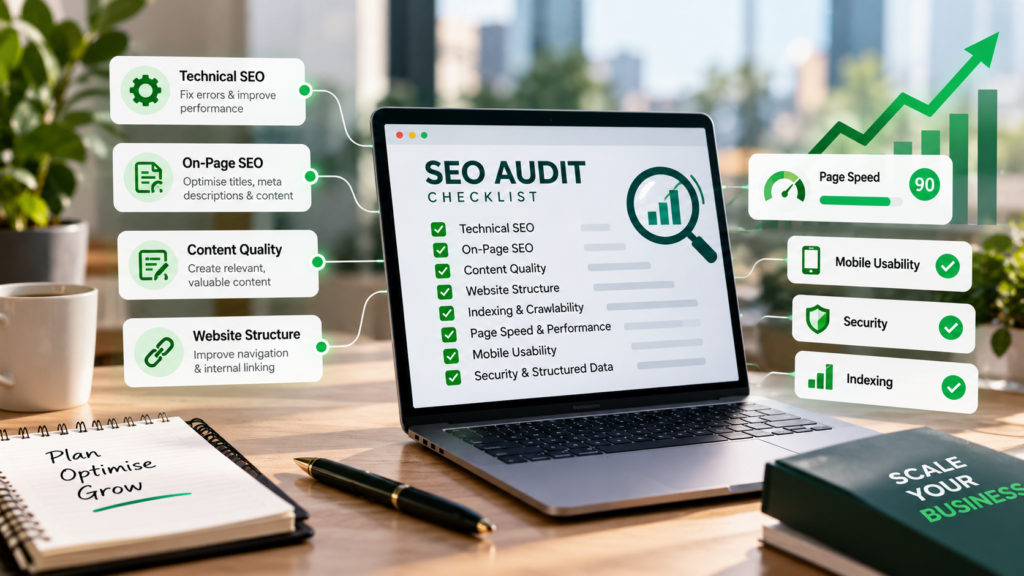
As a website grows, managing its pages, keywords, technical performance, and content becomes more complex. Existing problems can affect new pages if the underlying website structure is not addressed first. An SEO Audit Checklist helps businesses identify these weaknesses and decide which improvements deserve attention.
An audit also establishes a performance baseline. Businesses can review current organic traffic, important landing pages, and technical issues before making significant changes. This makes it easier to measure progress and direct resources towards improvements that support business goals.
Technical SEO Checks for Better Performance
Technical SEO helps search engines find and understand important website pages. Check indexing, page speed, mobile usability, security, and technical errors before expanding the website.
Google Search Console and PageSpeed Insights can help identify common issues. Review important pages and fix problems that may affect multiple URLs.
Check Website Indexing
Make sure important service pages and articles are accessible to search engines. Use Google Search Console to identify indexing issues and check whether any settings are blocking valuable pages.
Review Website Speed and Mobile Usability
Slow pages can affect the user experience. Use PageSpeed Insights to check loading speed and Core Web Vitals, and ensure that pages work properly on mobile devices.
Fix Broken Links and Redirects
Find broken links, redirect loops, and pages returning errors. Update incorrect links and use relevant redirects when a page has moved to a new URL.
Check Website Security and Structured Data
Ensure the website uses HTTPS correctly and that important pages load securely. Review relevant structured data to confirm it is accurate and matches the content visitors can see.
On-Page SEO Audit
On-page SEO helps search engines and visitors understand the purpose of each page. Review titles, meta descriptions, headings, URLs, and keyword relevance to ensure that important pages communicate their topics clearly.
Focus on key service pages, product pages, and articles that support business goals. Avoid making identical changes across every page because each URL should address a specific topic and user need.
Use this checklist during the review:
- Title tags: Write clear, descriptive titles that accurately reflect each page.
- Meta descriptions: Create relevant summaries that encourage users to understand what the page offers.
- Heading structure: Organise information using logical H1, H2, and H3 headings.
- Keyword relevance: Use relevant search terms naturally without unnecessary repetition.
- URL structure: Keep URLs readable, descriptive, and consistent.
- Canonical tags: Check that important pages identify the preferred URL where necessary.
Images also deserve attention during an on-page audit. Use descriptive file names, relevant alternative text for meaningful images, and appropriately sized image files. Compress images where needed to improve loading performance without sacrificing useful visual quality.
After reviewing these elements, prioritise pages that have clear business value or strong improvement potential. Avoid changing URLs without a valid reason, as unnecessary changes may create redirect issues and disrupt existing page signals.
Improving Content Quality for SEO
Content quality becomes increasingly important as a website expands. Adding more pages will not automatically improve organic traffic if the content is repetitive, outdated, or unable to answer users’ questions.
Review important pages for accuracy, relevance, originality, and usefulness. Strong content should explain the topic clearly, reflect the business’s expertise, and help visitors make informed decisions.
Check Content Relevance and Search Intent
Search intent describes what users want to achieve when searching online. Some users need service details, while others want comparisons, explanations, or practical guidance.
Ensure each page matches the purpose of its target queries. Improve content that provides vague answers, misses important information, or repeats keywords without adding value.
Identify Outdated Content and Keyword Cannibalisation
Review older pages for outdated facts, missing details, and information that no longer reflects current services or products. Update useful content where possible and consider consolidating pages when overlapping information creates unnecessary duplication.
Check whether multiple pages target similar keywords and compete for the same search intent. Compare their purposes and performance before deciding whether to differentiate, improve, or consolidate them.
Website Structure and Internal Linking
A clear website structure helps users find information easily and allows search engines to understand page relationships. Review navigation, page hierarchy, and internal links, and make sure important pages are accessible.
Use descriptive anchor text to connect related pages and help visitors discover useful content. Check for orphan pages and link them where relevant, avoiding unnecessary links that could make navigation confusing
Backlink Profile Audit
Backlinks are links from other websites that can help search engines discover content and understand connections across the web. Their value depends on factors such as relevance, context, and how naturally they are earned, rather than simply the total number of links.
Review your backlink profile using Google Search Console and suitable SEO tools. Focus on these areas:
- Referring domains: Review which websites link to your content.
- Relevance: Check whether linking websites relate to your industry or audience.
- Link placement: Consider whether links appear naturally within useful content.
- New and lost links: Monitor significant changes in your backlink profile.
- Suspicious patterns: Investigate unusual activity and manipulative link-building practices.
Avoid buying backlinks in bulk or participating in schemes designed to manipulate rankings. Not every unfamiliar or low-rated link is harmful, so investigate the evidence before considering link removal or disavowal.
SEO Performance Audit
Review organic traffic, clicks, impressions, and conversions to understand your website’s SEO performance and identify areas for improvement. Use Google Search Console and analytics tools to track results and compare performance over time.
Identify Pages That Support Business Goals
Some pages attract organic traffic, while others generate enquiries or sales. Review these outcomes together to identify which pages contribute most to business goals.
Track important landing pages and look for improvement opportunities. Pages with low conversions may need clearer service information, stronger calls to action, or better internal linking.
Review Image and Search Visibility Opportunities
Check that images load properly, use relevant alt text, and have optimised file sizes to support SEO and page speed. Review search queries with high impressions but few clicks, and improve page titles and descriptions where needed.
The Final SEO Audit Checklist Before Growth
Once the audit is complete, organise the findings into an action plan. This helps teams assign tasks, track fixes, and confirm that important problems have been addressed before website expansion.
Use this checklist before scaling:
- Confirm important pages are crawlable and indexable.
- Fix critical technical errors and broken redirects.
- Review speed, mobile usability, HTTPS, and Core Web Vitals.
- Check titles, meta descriptions, headings, and canonical tags.
- Optimise important images and validate relevant structured data.
- Update outdated content and address keyword cannibalisation.
- Improve internal links and resolve important orphan pages.
- Review backlink quality and investigate suspicious patterns.
- Record organic traffic, search visibility, and conversions.
- Create a prioritised plan for unresolved issues.
Keep a record of each issue, its priority, the action required, and its completion status. This creates a practical reference for future audits and reduces the risk of overlooking recurring problems.
How to Prioritise SEO Issues Before Scaling
Not every audit finding needs immediate attention. Start with critical indexing problems, broken pages, serious usability issues, and technical errors affecting important URLs. Fixing these problems first can prevent existing weaknesses from spreading as the website grows.
Next, prioritise content improvements and opportunities based on business value, expected impact, and available resources. Strengthen high-potential pages before expanding into new topics, then monitor performance after changes. This approach supports informed decisions instead of scaling simply to increase the number of pages.
Prepare Your Website for Sustainable Growth
A well-maintained website provides a stronger foundation for future expansion. Reviewing technical performance, content quality, internal links, backlinks, and search data helps businesses identify weaknesses before investing in additional pages or marketing activity.
Partner with SEO Agency Adelaide to strengthen your website’s SEO foundation and scale your business with confidence.